
Website Redesign Checklist: 25 Pre-Launch Items
A website redesign is one of the highest-stakes projects a business undertakes. Done well, it lifts conversions and sharpens your brand. Done carelessly, it tanks rankings, breaks lead-generating forms, and ships bugs your customers find before you do. Most redesign failures aren’t design failures — they’re checklist failures. Someone forgot the redirect map, the analytics tracking, or testing the contact form on a phone. This website redesign checklist is the pre-launch list we wish every project followed: 25 items across content, UX, technical SEO, speed, analytics, and QA.
Quick answer: A website redesign checklist covers six areas before launch: (1) content audit and URL inventory, (2) information architecture and UX validation, (3) design and conversion details, (4) technical SEO and a complete 301 redirect map, (5) speed and Core Web Vitals targets, and (6) analytics migration, form testing, integrations, and device QA. The single most important document is the redirect map — no map, no launch.
(If your main worry is specifically about preserving search rankings through a redesign, we covered that angle separately in how to redesign your website without losing SEO. This checklist is the broader pre-launch picture.)
Content audit: decide what survives
- Inventory every page. Crawl your current site and list every URL, its traffic, and its conversions. Pages with traffic, backlinks, or leads get special handling — they’re never simply deleted.
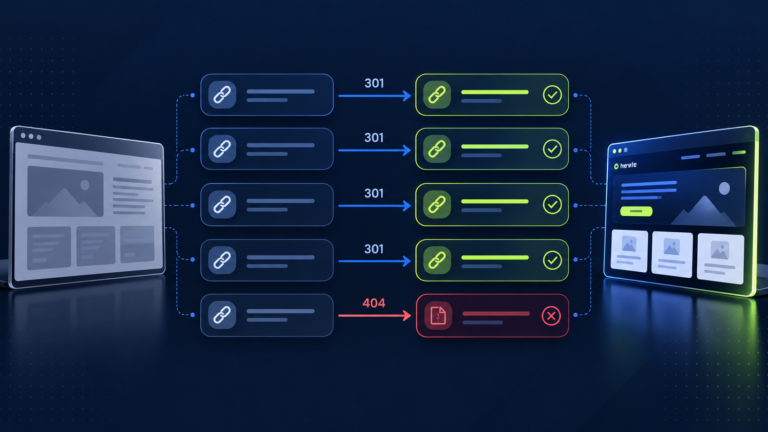
- Map old URLs to new ones. For every URL that’s changing or disappearing, decide its destination: the closest equivalent new page, or a relevant parent page. This redirect map is the single most important document in the project. No map, no launch.
- Prune ruthlessly — but redirect the pruned. Thin, outdated, or duplicate pages should be consolidated or removed, but each removed URL still needs a proper 301 redirect. Deleting pages without redirects is how sites lose years of link equity overnight.
Information architecture and UX
- Validate the navigation with real tasks. Can a first-time visitor find your pricing, contact info, and main service in under 15 seconds? Test with five people who’ve never seen the site.
- Keep the conversion path short. Count the clicks from homepage to completed contact form. Every unnecessary step leaks leads. The best-performing sites get visitors from landing to inquiry in two to three clicks.
- Design mobile-first, not mobile-also. Over half your visitors are on phones, and Google indexes your mobile version. Review every key page on an actual phone, not just a resized browser window.
Design and conversion
- Make the primary call to action unmissable. Every page should have one obvious next step — visible without scrolling, repeated at natural decision points, and written as an action (“Get a free quote,” not “Submit”).
- Prove your claims near the ask. Testimonials, review counts, case-study snippets, and trust badges belong close to forms and CTAs, not buried on a separate page.
- Check contrast and readability for real. Run your text/background combinations through a contrast checker. Body text should be at least 16px. Fancy thin fonts on light-gray backgrounds are the most common readability failure in modern redesigns.
Technical SEO and redirects
- Implement the 301 redirect map. Every old URL from item 2 gets a server-side 301 redirect to its mapped destination. Test every single one before launch — not a sample, all of them. Redirect chains (A → B → C) should be flattened to A → C.
- Preserve title tags and meta descriptions — or improve them deliberately. If a page ranked well, its title tag was part of the reason. Don’t let a redesign silently rewrite them.
- Keep URL structure stable where possible. Every changed URL is a redirect to maintain and a small ranking risk. Change URLs only for a clear structural reason.
- Update the XML sitemap and robots.txt. The sitemap should list only the new canonical URLs. Check robots.txt isn’t blocking anything it shouldn’t — staging-site “Disallow: /” rules have killed more launches than any other single line of text.
- Carry over schema markup. If your old site had LocalBusiness, FAQ, or review schema, make sure the new site has it too — describing content that’s actually visible on the page. This is easy to lose in a platform migration.
Speed and Core Web Vitals
- Set a performance budget and hit it. Decide your targets before launch — for example, Largest Contentful Paint under 2.5 seconds on mobile — and treat them as launch blockers, not aspirations. Common redesign regressions: unoptimized hero images, five font weights loading, three analytics scripts, and a page builder adding 400KB of unused CSS.
- Optimize images properly. Compress every image, serve modern formats (WebP/AVIF), lazy-load below-the-fold images, and set explicit width/height attributes to prevent layout shift. Images are the #1 cause of slow redesigns and the easiest win on the list. See our Core Web Vitals guide.
Analytics, forms, and integrations
- Migrate analytics tracking completely. GA4 tags, conversion events, form-submission goals — everything must fire on the new site. The classic failure: launching Friday, discovering Monday that three days of conversions were never recorded. Test each event with a real submission in staging.
- Test every form end to end. Submit each form as a visitor would, confirm the data arrives where it should, and check the confirmation message and autoresponder. Test on mobile, and test with an invalid entry to see the error handling.
- Reconnect every integration. Email marketing, CRM, booking systems, live chat, payment processors, review widgets — list them all and verify each one on the new site. Integrations are the most commonly forgotten item in platform migrations.
- Set up Search Console and error monitoring from day one. Verify the new property, submit the sitemap, and set up alerts for crawl errors and security issues. Add uptime monitoring too.
QA and pre-launch checks
- Proofread everything. Read every page aloud, or have someone unfamiliar with the project do it. Redesigns are notorious for lorem ipsum remnants and copy-pasted text referencing the old company name. Check the footer on every page — it’s where stale information hides.
- Click every link. Internal links, footer links, social icons, PDF downloads. Automated link checkers catch the broken ones fast; do a manual pass on the important ones.
- Test on real devices and browsers. At minimum: current Chrome, Safari, and Edge, plus an iPhone and an Android phone. Safari is where CSS surprises live.
- Verify the launch-day mechanics. DNS changes, SSL certificate, www vs. non-www redirects, staging-site noindex removed, password protection removed. Do a full dry run of the cutover on a staging environment first.
- Plan the post-launch watch. Rankings wobble after any significant redesign — normal. Not watching is not. Monitor Search Console daily for two weeks, compare conversions to pre-launch baselines, and keep the old site’s backup and redirect map accessible for 90 days.
Frequently asked questions
How long should a website redesign take?
A focused small-business redesign typically takes 6–12 weeks from kickoff to launch, depending on page count and content readiness. The most common delay isn’t design — it’s content: waiting on final copy, photos, and approvals. Start content work on day one.
Should we redesign or just update our current site?
If your structure, platform, and content are fundamentally sound, targeted updates usually beat a full rebuild — less risk, faster payoff. Redesign when the problems are structural: outdated platform, broken mobile experience, confusing architecture, or a brand that no longer fits. Our web design and development process starts with this exact assessment.
What’s the biggest website redesign mistake?
Launching without a redirect map and without testing forms and analytics. Either one can erase years of SEO equity or weeks of lead flow in a single afternoon — and both are entirely preventable with this checklist.
Will a redesign hurt my Google rankings?
It can, but it doesn’t have to. Rankings wobble after any significant redesign — that’s normal. Protect them with a complete redirect map, preserved titles and content, stable URLs where possible, and post-launch monitoring. Our SEO-safe redesign guide covers the ranking-preservation angle in depth.
What should be tested before launching a redesigned website?
Every form submitted end to end, every integration (CRM, email, booking, chat), all analytics events firing, every link clicked, all pages proofread, the site on real phones and browsers, and launch-day mechanics — DNS, SSL, redirects, and removal of staging blocks. Test in staging, not after launch.
Launch with confidence, not hope
Scalix Digital manages redesigns end to end — audit, redirect mapping, design, development, QA, and post-launch monitoring.